Getting deals · for talent managers
Whop Clipping Campaigns: How They Work and How to Run One
- A clipping campaign turns one long video into many short posts by paying clippers a rate per 1,000 views, with a minimum and a cap per clip.
- On Whop you add the Content Rewards app, fill in a campaign form, fund the budget, then approve or reject each submission against your written requirements.
- The number to judge a campaign by is your effective cost per 1,000 views across all clips, not the headline rate.
A clipping campaign pays people to cut your long videos into short clips and post them on their own accounts. You pay per 1,000 views, and only for posts you approve. On Whop, the campaign is funded up front, and the rate, the minimum and the cap per video are set by the brand.
Most pages on this search are written for the clipper who wants to earn. This one is written from the other chair: the brand, the streamer, the podcast or the agency that runs the campaign. It covers how a Whop clipping campaign works, what it costs, and the settings that decide whether your budget buys views or gets drained by a few outliers.
What is a clipping campaign?
A clipping campaign has three parts: source content, clippers, and a payout rule. The source content is something long that you already own, such as a podcast, a livestream or a webinar. The clippers cut short moments from it for TikTok, YouTube Shorts, X and Instagram Reels. The payout rule says what each clip earns as it collects views.
That payout rule is what separates a clipping campaign from hiring an editor. You do not pay for hours of editing. You pay for views that real accounts earned, and a clip nobody watched costs you little or nothing.
What does Whop clipping mean?
Whop is a marketplace platform, and Content Rewards is an app a brand adds to its own whop. Searches for whop clipping mostly come from two groups. Clippers want to know how to earn from these campaigns. Brands want to know how to launch one.
Whop's documentation says brands pay creators based on views for content about the brand. Creators post to their own social accounts. Payment happens only after the brand approves the post, and Whop then pays automatically based on the views the post receives.
Content Rewards has two campaign types. Clipping means cutting your existing long-form content into short clips. UGC means creators make original content about your brand from your guidelines. This page is about the first type.
How does a Whop clipping campaign run, step by step?
These are the steps in Whop's own documentation, read on 2026-10-16. Check the current form on Whop before you rely on any detail here, because platforms change their screens.
- Add the app. In your whop, choose Add app, pick Content Rewards from the App Store, and add it.
- Fill in the campaign form. You enter a campaign name, the type (clipping or UGC), a brand category, the total budget and the reward rate per 1,000 views.
- Set the minimum and maximum payout. The minimum is the least a video must earn before it enters your review queue. The maximum caps what one creator can earn from one video.
- Add the optional flat fee bonus, which is a fixed amount added to every approved submission on top of the view-based earnings.
- Choose the platforms, upload your available content and guidelines, and write the requirements creators must follow.
- Fund the campaign. Whop says processing takes about a minute, and the campaign then moves from Pending budget to Active.
- Review submissions. You approve posts that meet your requirements and reject the ones that do not. Only approved posts are paid.
How do the minimum and the cap work in numbers?
Whop's documentation gives two examples that show the maths. With a rate of $3 per 1,000 views, a $6 minimum means a video needs about 2,000 views before it reaches your review queue. With the same rate, a $3,000 maximum stops one video's earnings at about 1 million views.
Both follow the same rule: views divided by 1,000, times the rate. Run the rule backwards to turn any dollar setting into a view count, as below.
What does a clipping campaign cost?
The cost is the budget you fund, and it is spent only as approved clips earn views. Whop's own blog says clippers are on average paid $1 per 1,000 views, and that brands set their own rates. Treat that as a starting point, because the rate that fits depends on your niche and on how hard your footage is to cut well.
At the time of reading, Whop's documentation page did not list platform fees or a minimum campaign budget, and its Content Rewards page did not either. Third-party guides quote both, but they cite no Whop page, so this article leaves them out. Read the fee terms inside Whop before you fund anything.
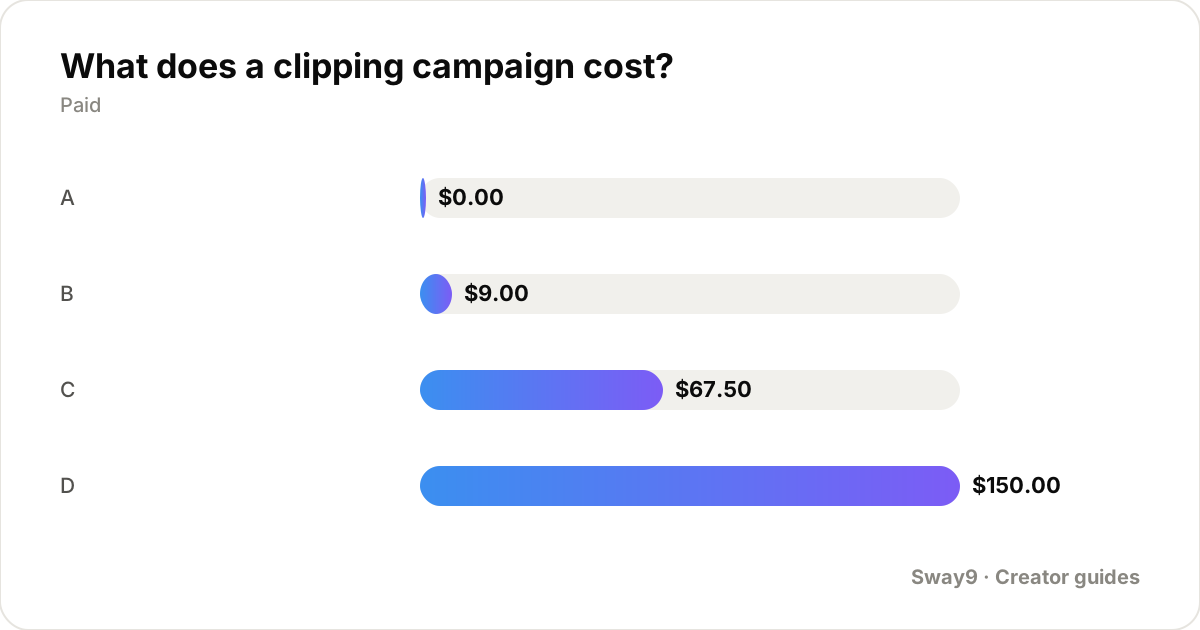
The worked example below uses a hypothetical $5,000 budget and a $1.50 rate to show how the settings combine. These are example inputs, not market prices.
| Clip | Views | Views ÷ 1,000 × $1.50 | Paid |
|---|---|---|---|
| A | 1,200 | $1.80, under the $3 minimum | $0.00 |
| B | 6,000 | $9.00 | $9.00 |
| C | 45,000 | $67.50 | $67.50 |
| D | 180,000 | $270.00, over the $150 maximum | $150.00 |
How do you run one well?
Start with source content that has clear moments in it. Clippers cut faster and better from material with strong lines, reactions or arguments than from slow footage. Upload the full video or a folder of episodes, and name the characters, products and phrases you want kept or avoided.
Write the requirements as a checklist a stranger could follow, because rejection is only fair against something stated. Cover the length range, the required caption text or tag, the platforms allowed, and anything banned, such as other brands' logos.
Set the minimum to filter noise, not to avoid paying. A minimum above what most clips reach means most clippers earn nothing, and they will leave. Keep it near a few thousand views at your rate.
Set the cap to your risk. A cap protects the budget from one runaway clip, and it also limits the clip that helped you most. Pick a number you would still be happy to pay for a real hit.
What should you check before approving a clip?
- The clip follows every written requirement, and you can name the one it breaks if you reject it.
- The account is a real account that posts other content, not a shell made for one campaign.
- The views look normal for the account and the platform, with likes and comments in a plausible ratio.
- The source is your own content and nothing else is spliced in that you do not have the right to use.
- The numbers still hold a few days later, since view counts move after posting.
How does Sway9 fit with a clipping campaign?
Whop shows you views for the campaigns it runs. If you also run clipping or creator programs outside it, or want one view of several programs, you need a separate record. Sway9 is a platform for running UGC creator campaigns, and it is free to start.
You set a campaign up with its rate, either per 1,000 views or a flat amount per post. You add each creator's handles. Sway9 then fetches their TikTok and Instagram posts and views automatically, up to three times a day, and keeps a daily history per post. It computes spend and effective CPM as the views come in, which is the number in the worked example above.
It does not run a marketplace for clippers on its own; open campaigns on Sway9 are listed for creators at sway9.com/creator/explore. For the full set of rate, cap and minimum choices, see sway9.com/blog/how-to-pay-creators-per-view.
What should you ask a clipping agency?
A clipping agency runs the campaign for you: it recruits the clippers, sets the rules and reviews the posts. Before you hire one, ask for the questions below in writing. They apply the same checks you would run yourself.
- Who pays the clippers, and is that money inside your budget or on top of the agency fee?
- How are views counted, and can you see the public view count on each post yourself?
- Who approves and rejects clips, and against which written requirements?
- What happens to unspent budget at the end of the campaign?
- Which accounts will post, and can you see their handles?
Where do you go if you want to earn as a clipper?
If you came here to earn rather than to hire, the other side of this search is covered elsewhere on Sway9. The guide at sway9.com/blog/creators/how-to-find-pay-per-view-campaigns covers where to find open campaigns. It also shows how to read a rate, a cap and a minimum before you post. The page at sway9.com/blog/how-much-do-clippers-make covers what clippers earn and why most posts earn little.
Frequently asked questions
What is a clipping campaign?
A clipping campaign pays people to cut short clips from your long videos and post them on their own accounts. You pay a rate per 1,000 views, usually with a minimum and a cap per clip, and only for posts you approve.
How do Whop clipping campaigns work?
A brand adds the Content Rewards app to its whop, sets a budget, a rate per 1,000 views, a minimum and maximum payout and its requirements, then funds the campaign. Creators post clips, the brand approves or rejects them, and Whop pays approved posts based on views.
What is content clipping?
Content clipping is cutting a long piece of content, such as a podcast, stream or webinar, into short clips for platforms like TikTok, YouTube Shorts and Instagram Reels. The clips point viewers back to the source and can be paid per view.
Do I need a clipping agency to run a campaign?
No. You can fund and run a campaign yourself on a platform that supports it. An agency saves you the recruiting and reviewing, and you pay for that. Ask where the clipper payouts sit before you sign.
Where do I find clipping jobs?
Clipping jobs are open campaigns that brands list for creators. Look at open campaign directories, clipping marketplaces and the campaign pages brands publish themselves, then read the rate, the cap and the minimum before you apply.
Track your whole roster in one place
Every creator's accounts, every deal set up as a campaign with its rate, every post and view pulled in automatically. From $22/mo for 25 tracked accounts, unlimited team members, no per-seat fees.
Get started Cancel any time · unlimited team members on every planSources: Whop docs: Content Rewards · Whop blog: Content Rewards · Sway9: how to pay creators per view · Sway9: how to find pay-per-view campaigns · Sway9: how much do clippers make